
Step by step.
Delivery your clients can see.
Requirements that keep changing, person-days nobody agrees on, clients chasing progress, sign-off that never comes? Stepwise puts your team and your client in one flow: the client approves the scope, every change is recorded, clients follow progress themselves, and acceptance happens online.
- Free to start, ready in minutes
- Client portal, nothing to install
- Self-hosting available
- Custom development available
Heard any of these lately?
When you build for clients, the hardest part is rarely the code. It is everything that stays unclear between you and the client. Stepwise puts all of it into one flow.
Locked versions become the baseline; adding or changing a requirement needs the client's approval online, with who approved it and when on record.
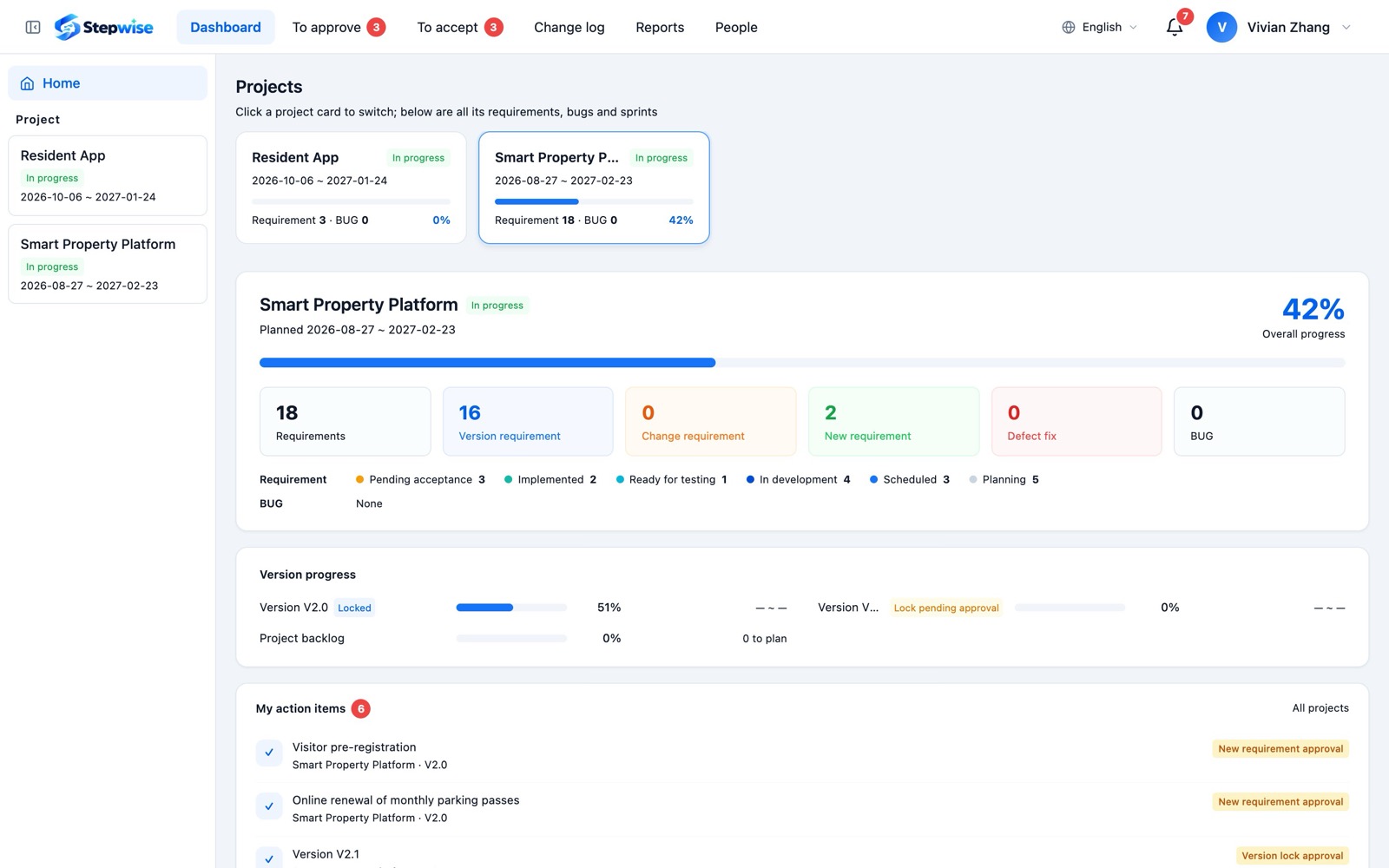
Learn moreClients follow versions and weekly progress live in the portal, and get the weekly report on the last workday of the week.
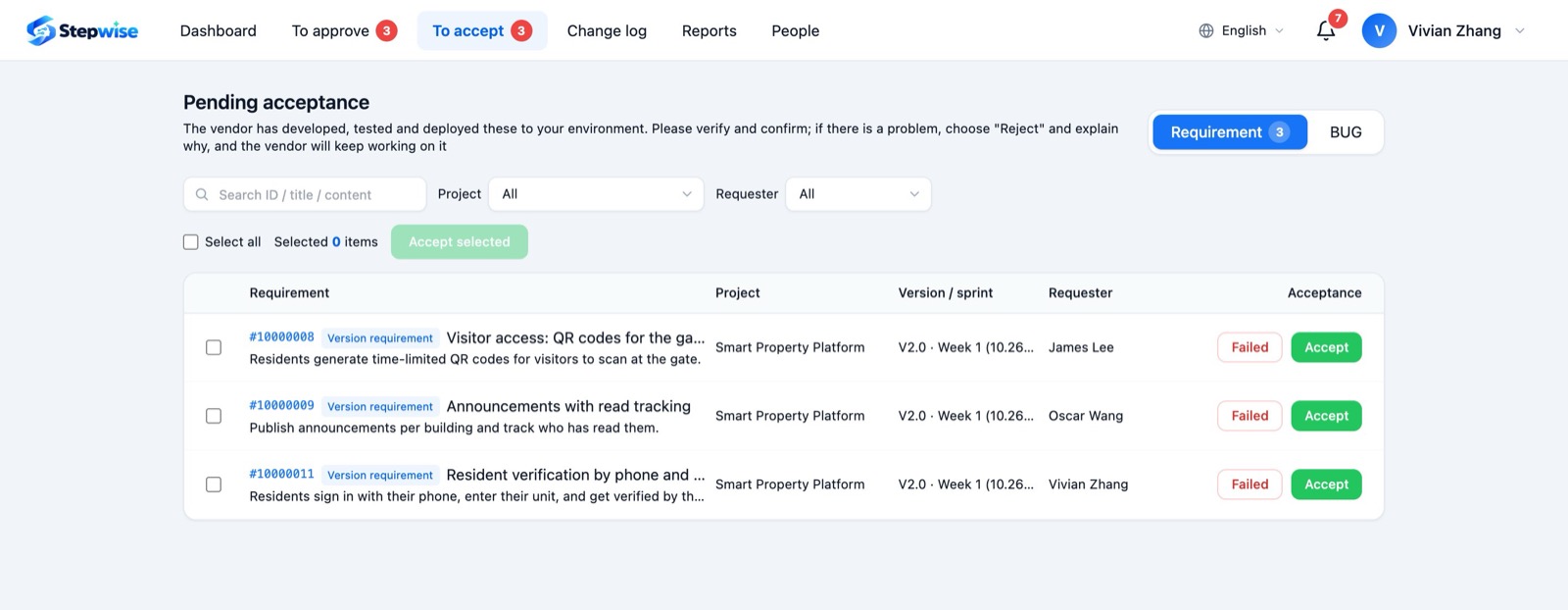
Learn moreSubmit finished requirements for acceptance in one click; clients accept online or explain what is wrong with screenshots, all on record.
Learn moreAdditions and changes are agreed in person-days in the change log and exported to Excel to reconcile line by line.
Learn moreSelf-host Stepwise with Docker on your own servers: the database and attachments stay in your data center.
Learn moreCustom development: we adapt features and fields to your process, connect the systems you already use, and put your own logo and domain on it.
Learn moreTypical tools stop at your team. Stepwise reaches your client.
Typical project management tools focus on how your team works inside. When you build for clients, the hard part is the approvals, changes and acceptance with the client.
 With Stepwise
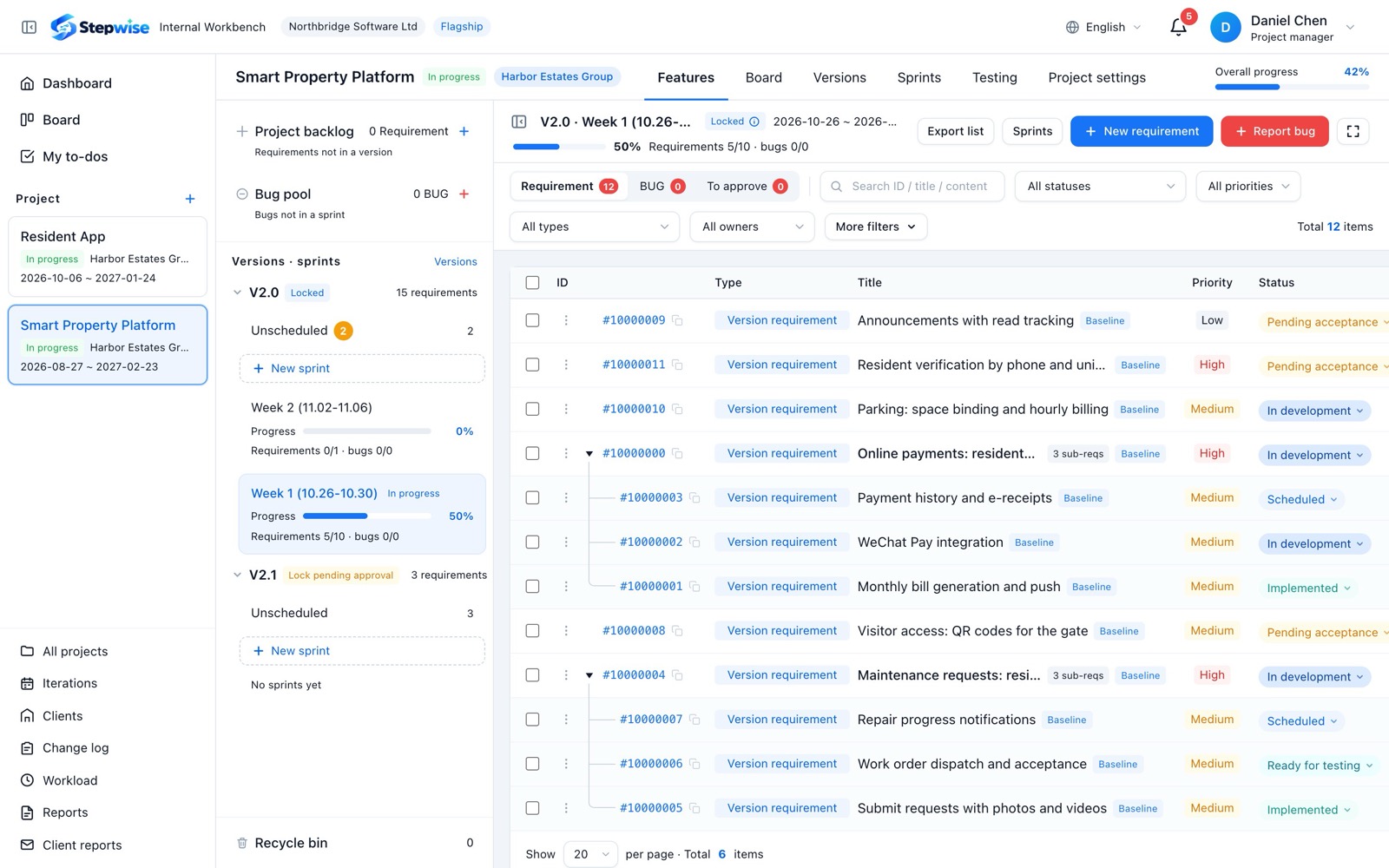
Your team and your client, working on the same requirement
Everything stays with the requirement: who raised it, who approved it, when it was accepted.
- Backlog and version planning
- Weekly sprints and hour splits
- Build, hand over, test
- Bug fixing and verification
- Workload and KPI
- Raise requirements and bugs
- Approve scope and changes
- Follow live progress
- Accept work online
- Receive the weekly report
Five capabilities across the whole delivery
From the client's first request to acceptance, settlement and review, every step happens in Stepwise.
Clients see everything, and decide in one click
Give every client their own portal. Nothing to install: in the browser they follow progress, raise requirements and bugs, approve scope and accept finished work.
- Live progressVersion progress and how each weekly sprint is going. Clients check it themselves, so you stop answering "where are we?".
- Online approvalsVersion lock, new requirements, moves out of a version and change requests: clients approve or decline in the portal, naming who approved and why.
- Online acceptanceSubmit finished requirements for acceptance in one click. Clients accept, or explain what is wrong, screenshots included.
- Weekly client reportGenerated on the last workday of every week: what was delivered, what was fixed, what comes next. Exports to PDF.
Step by step, all the way to your client
- 01Collect requests
Clients raise them in the portal, your team adds its own; everything lands in the project backlog before it is planned.
- 02Agree the scope
Send this version's requirements to the client; once approved, they are locked as the baseline.
- 03Plan the sprints
Plan into one company-wide weekly rhythm and split the hours row by row to the people doing the work.
- 04Build and test
Developers accept and hand over, testers pass or send back; several people can fix one bug together.
- 05Deliver and accept
Deploy to the client, submit for acceptance, and the client accepts or explains why not in the portal.
- 06Report and settle
Sprints settle every night and unfinished work rolls over; the weekly client report goes out automatically.
AI is coming to every step of delivery
What is live can be used today; more AI capabilities are coming soon.
Export a requirement or bug in one click: title, description, acceptance criteria, screenshots, videos and comments packed into one zip. Hand it to an AI coding tool such as Claude Code or Cursor, and it can read the requirement and start working.
- AI requirement breakdown and estimatesComing soon
- AI-drafted project and client reportsComing soon
- AI-generated test cases and acceptance checklistsComing soon
- AI risk alertsComing soon
Ready out of the box, in your data center, or shaped to your process
Open to every team: start free and set up your team space in minutes, with no approval and no waiting for sales.
Deploy with Docker on your own servers; your data never leaves your data center.
We adapt features and fields to your process, connect the systems you use, and put your own logo and domain on it.
Companies and projects are strictly isolated, with strong passwords, lock-out, a full history and a recycle bin.
Built for these teams
Scope, changes, person-days and acceptance, all on record
Several clients at once, without losing the rhythm
People everywhere, work and results still visible
Your vendor runs Stepwise, you follow everything in the portal
Start free, upgrade as you grow
The free plan already includes the client portal. Contact us for pricing on paid plans.
Frequently asked questions
How is Stepwise different from a typical project management tool?
Typical tools manage how your team works internally. Stepwise adds a client portal, so scope approval, changes, acceptance and weekly reports with your client live in the same flow. It is built for teams that deliver projects to clients.
Can anyone sign up?
Yes. Stepwise is open to every team: start free right away, with no approval and no waiting for sales.
Do my clients pay or install anything?
No. You create their portal accounts and they use it in the browser. Plan seats only count your own team members; client accounts are free.
Can we self-host Stepwise?
Yes. The Enterprise plan can be deployed on your own servers with Docker, so your data stays with you. Book a demo to talk about deployment.
Can you adapt Stepwise to our process?
Yes. We offer custom development: adapting features and fields to your process, connecting DingTalk, Feishu, OA and single sign-on, putting your own logo and domain on it, and migrating your history from TAPD, Jira or Excel. Contact us and we will scope it with you.
Which languages are supported?
Chinese, English and Portuguese. Team members and clients each choose their own interface language.
Is there a mobile app?
iOS and Android apps are being planned. Today your team and clients use Stepwise in a desktop browser, and project updates can be pushed to WeCom groups.
What can I do on the free plan?
Up to 5 projects and 20 members, with projects, requirements, bugs, boards and the client portal, enough to run the full flow from request to client acceptance.
How do I get started?
Click "Start free", enter your company name and an admin account, and your team space is ready in minutes. Or book a demo and we will walk you through it for your team.
Let your clients see every step
Start free, set up your team space in minutes, and invite your team and clients.